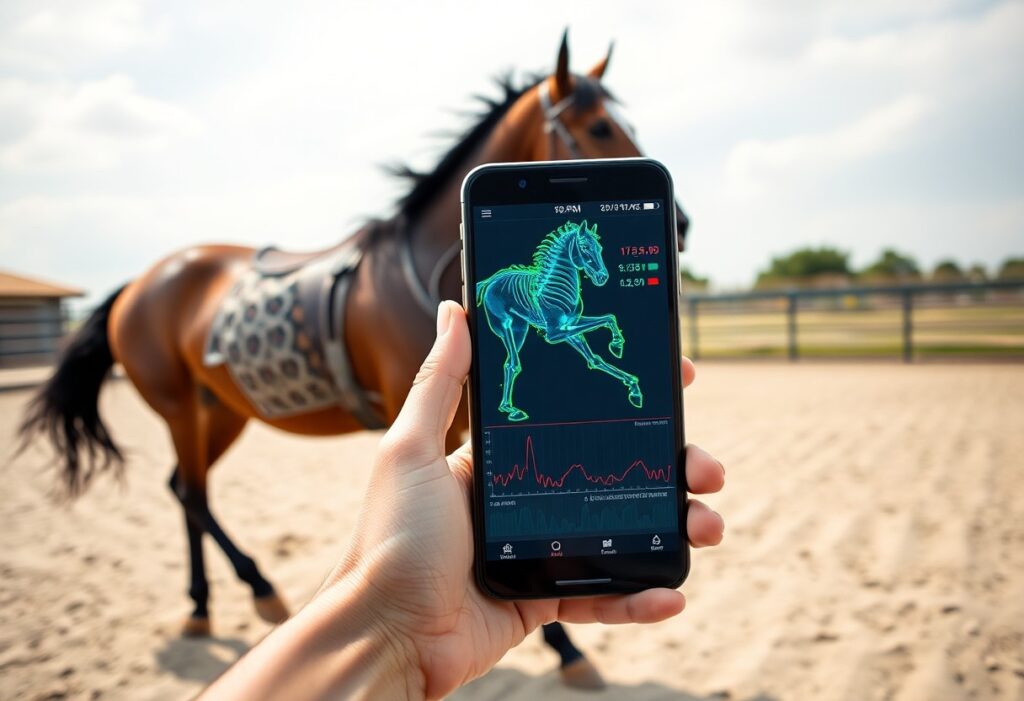
Most horse owners miss early signs of lameness because subtle gait changes are hard to detect with the naked eye. Your smartphone can capture dangerous irregularities in your horse’s movement, allowing you to spot early indicators of injury before they become serious. With simple apps and proper technique, you gain real-time insights into your horse’s musculoskeletal health-right from the barn.
Key Factors Influencing Equine Locomotion and Soundness
Horse movement depends on multiple interconnected elements.
- Conformation affects joint alignment and stride efficiency
- Hoof balance influences shock absorption and limb function
- Muscle symmetry supports even weight distribution
- Rider weight can alter natural gait patterns
The way your horse moves today reflects long-term biomechanical health.
Identifying the four natural gaits
You observe walk, trot, canter, and gallop as the horse’s natural movement patterns. Each gait has a distinct rhythm and footfall sequence. The walk is a four-beat gait with constant ground contact. The trot is a two-beat diagonal gait with a moment of suspension. The canter is a three-beat gait showing consistent lead preference. The gallop adds speed and full suspension. The ability to recognize normal gait mechanics helps you spot subtle changes early.
Recognizing early indicators of lameness or discomfort
Slight head bobs or uneven stride lengths often signal the first signs of trouble. You might notice your horse favoring one leg during turns or resisting transitions. Asymmetrical muscle development or inconsistent hoof wear can also point to underlying strain. The earlier you catch these cues, the better the outcome.
Subtle changes in movement may not look serious, but they can indicate developing joint, hoof, or soft tissue issues. You might see a shortened hind limb extension, reluctance to engage the hindquarters, or irregular weight shifting at rest. These behaviors often precede visible lameness by weeks. Monitoring with smartphone video helps detect asymmetries invisible to the naked eye. The consistency of your observations builds a reliable baseline for long-term health tracking.
Selecting the Right Smartphone Tools and Software
Modern smartphones can transform how you monitor your horse’s movement. Look for apps designed specifically for equine gait analysis that offer slow-motion playback, motion tracking, and angle measurement. Ensure compatibility with your device’s camera and operating system. The
Essential features to look for in gait analysis apps
Choose apps that provide frame-by-frame playback, angle measurement tools, and the ability to overlay multiple video clips for comparison. Reliable apps also allow you to mark stride phases and export data for vet review. The
- Frame-by-frame analysis reveals subtle lameness signs
- Angle measurement helps assess joint flexion accurately
- Video export supports professional consultation
- Side-by-side playback enables gait symmetry evaluation
Hardware tips for stable field recording
Use a lightweight tripod or monopod to eliminate hand shake and maintain a consistent shooting angle. Record in bright, even lighting to avoid shadows that distort motion data. Keep the horse on a level, non-slip surface during filming. The
- Stable mounting prevents blurry, unusable footage
- Consistent distance ensures accurate comparative analysis
- Natural lighting reduces contrast errors in motion tracking
- Wide-angle view captures full stride without cropping
Position yourself perpendicular to the horse’s path at a distance of 10-15 feet to capture a full-body view without distortion. Avoid zooming in, as digital zoom reduces resolution and compromises gait detail. Record several straight passes at walk and trot, ensuring the hooves and joints are clearly visible. The
How to Prepare the Testing Environment
Proper setup ensures reliable gait data every time you assess your horse. Choose a quiet, distraction-free area where your horse can move naturally without interruptions. Ensure consistent lighting and keep bystanders at a distance to prevent interference with your smartphone’s camera focus and tracking accuracy. Even small environmental changes can skew results, so repeat tests under the same conditions.
Choosing the optimal surface for accurate data
Surface consistency directly impacts the quality of your gait analysis. Use a level, firm, and even surface like packed dirt or rubber footing to minimize variability in stride measurements. Uneven or slippery ground can mask lameness or create false irregularities, compromising your assessment.
Marking the horse for enhanced motion tracking
Place high-contrast markers on key joints-such as fetlocks, knees, and hocks-to improve your smartphone app’s ability to detect movement. Use athletic tape or temporary paint that won’t irritate the skin. Clear visual reference points dramatically increase tracking precision, especially in lower-light conditions.
Adding visible markers transforms how accurately your smartphone interprets motion. By highlighting anatomical landmarks, the software can distinguish subtle asymmetries in limb movement that might otherwise go unnoticed. Apply markers symmetrically and double-check their position before recording-even slight misplacement can lead to misleading data. This simple step bridges consumer technology with clinical-level insight.
Step-by-Step Guide to Capturing Professional Quality Video
| Equipment Needed | Smartphone with rear camera, tripod or stable mount, measuring tape |
| Recording Surface | Flat, even ground with good traction (e.g., arena footing or pavement) |
| Horse Preparation | Clean legs, no wraps; ensure horse is warmed up and relaxed |
| Video Settings | Use 60fps or higher, record in landscape mode, disable digital zoom |
Follow these steps carefully to ensure your video captures accurate movement data. Proper setup directly affects the reliability of your gait analysis. This helps you detect subtle lameness early.
Positioning the camera for side, front, and rear views
Stand at the horse’s midline for side views, ensuring the full body is in frame as it passes parallel to you. For front and rear shots, align the camera with the horse’s centerline to capture symmetry in limb movement. Keep the lens at fetlock height to reduce distortion. This allows precise assessment of joint flexion and limb alignment.
Factors for maintaining consistent frame rates and lighting
Use your smartphone’s highest stable frame rate-ideally 60fps or more-to avoid motion blur. Shoot in consistent natural light, preferably on an overcast day or in open shade, to eliminate harsh shadows and flicker. Avoid backlighting and sudden light changes during recording. This ensures smooth playback for accurate stride evaluation.
- Record in 60fps or higher to capture rapid limb movements clearly
- Use manual camera settings if available to lock exposure and focus
- Choose consistent lighting-direct sunlight creates contrast issues
- Keep the white balance stable to prevent color shifts between clips
- Avoid recording during golden hour when light changes quickly
Stable frame rates and even lighting preserve temporal accuracy in motion analysis. Variability can distort timing cues crucial for identifying asymmetries. This supports reliable detection of early-stage lameness indicators.
Interpreting Movement Patterns and Symmetry
Observing your horse’s movement symmetry helps identify early signs of discomfort or injury. Uneven limb loading, asymmetrical stance, or altered tracking can signal musculoskeletal issues. Smartphones capture these deviations through slow-motion video and gait-tracking apps. Thou can detect imbalances before they become serious by reviewing consistent baseline recordings.
Analyzing stride length and frequency factors
Stride metrics reveal how your horse’s fitness and soundness evolve over time.
- Shortened stride length may indicate pain or fatigue
- Inconsistent stride frequency can reflect neurological or muscular strain
- Asymmetry between left and right limbs often precedes lameness
Thou can catch developing problems early with regular, comparative analysis.
Tips for detecting subtle changes in vertical oscillation
Small shifts in up-and-down motion often go unnoticed without tools.
- Increased vertical bounce may suggest stiffness or poor coordination
- Reduced oscillation amplitude can point to compensatory movement
- Irregular rhythm in bounce pattern might reveal early lameness
Knowing these signs helps you act before discomfort worsens.
Vertical oscillation reflects how smoothly your horse moves through each gait. Subtle changes often stem from soreness in the back, hocks, or stifles.
- High-frequency vibrations may indicate muscle tension
- Asymmetrical rise and fall between strides suggests limb imbalance
- Dampened peak height during trot often correlates with pain avoidance
Knowing these patterns allows timely intervention and better recovery outcomes.
Long-Term Health Monitoring and Data Management
Your smartphone turns into a powerful tool for tracking subtle changes over time. Regular gait recordings build a detailed history, revealing patterns that might signal early injury or response to treatment. Consistent data collection helps catch issues before they become serious, giving you a proactive edge in your horse’s care.
How to establish a baseline for your horse
Start by recording your horse’s walk, trot, and canter on firm, level ground when sound and relaxed. Perform multiple sessions over a few days to capture normal variation. This baseline becomes your reference point for detecting future asymmetries or lameness, making early intervention possible.
Sharing digital reports with veterinarians and farriers
You can instantly send video clips and gait metrics directly from your phone. Clear, time-stamped data gives professionals objective evidence to assess hoof balance, lameness progression, or rehabilitation success-no guesswork needed during appointments.
Digital reports eliminate reliance on memory or subjective descriptions. When you share synchronized videos and motion analysis, your vet sees exactly what you see-timing, stride length, and limb symmetry. This level of detail improves diagnostic accuracy and strengthens collaboration across your horse’s care team, leading to faster, more informed decisions.
To wrap up
Following this guide, you now know how to use your smartphone to track your horse’s gait and detect early signs of lameness or discomfort. You can capture movement with your camera, use apps to analyze stride patterns, and monitor changes over time. This regular observation puts you in control of your horse’s health, allowing timely vet consultations when deviations occur.
FAQ
Q: How can I use my smartphone to perform gait analysis on my horse?
A: Modern smartphones have built-in sensors like accelerometers and gyroscopes that can detect movement patterns. By mounting your phone securely on your horse-such as in a saddle pad pocket or a girth-mounted case-you can record motion data while the horse walks, trots, or canters. Several equine health apps use this data to analyze stride length, symmetry, and rhythm. You simply follow the app’s instructions to record a session, and it provides visual feedback or alerts if irregularities are detected. This helps identify subtle lameness or asymmetry that might not be visible to the naked eye.
Q: Are smartphone-based gait analysis tools accurate enough for early injury detection?
A: Smartphone tools can detect changes in movement over time with reasonable accuracy, especially when used consistently under the same conditions. While they don’t replace veterinary diagnostics or high-end motion capture systems, they are effective for spotting trends. For example, a gradual decrease in stride symmetry or increased variability in footfall timing may signal discomfort or early-stage lameness. When paired with regular observation and veterinary checkups, these tools offer a practical way to monitor your horse’s musculoskeletal health between visits.
Q: What should I do if my smartphone gait app detects an abnormality?
A: If your app flags a change in your horse’s gait, start by reviewing the recording conditions. Make sure the phone was mounted securely and the surface was consistent with previous sessions. Repeat the test to confirm the result. If the irregularity persists, observe your horse closely for other signs like head bobbing, reluctance to move, or uneven muscle development. Then, share the app data with your veterinarian or equine physiotherapist. They can interpret the findings in context and recommend a physical exam or further diagnostics if needed.